 SaveBack
Thanksgiving Shopping Made Easier.
Between holiday preparations, gifts, groceries, and online orders, there's a lot to keep track of. SaveBack helps you keep everything organized in one place.
Enjoy the holidays. We'll help you keep track of the orders.
These buttons open the SaveBack app on your iPhone.
Every order. Every return window. One app.
SaveBack is an iPhone app that keeps your online purchases in one place, counts down return deadlines, and tracks refunds until the money is back in your account.
Launching at $0.99 for the first 10,000 customers. One payment. No subscriptions. No monthly fees.
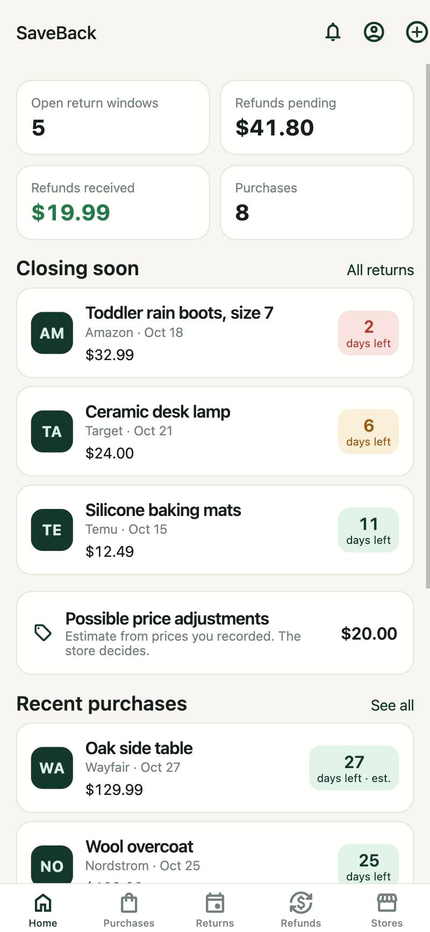


Every Purchase. Every Deadline. One Calendar.
Return windows close quietly. Every store has its own deadline, buried in a different email.
Refunds go unchecked. You sent it back weeks ago. Did the money ever arrive?
Receipts scatter. Confirmation emails, paper slips and screenshots end up everywhere.
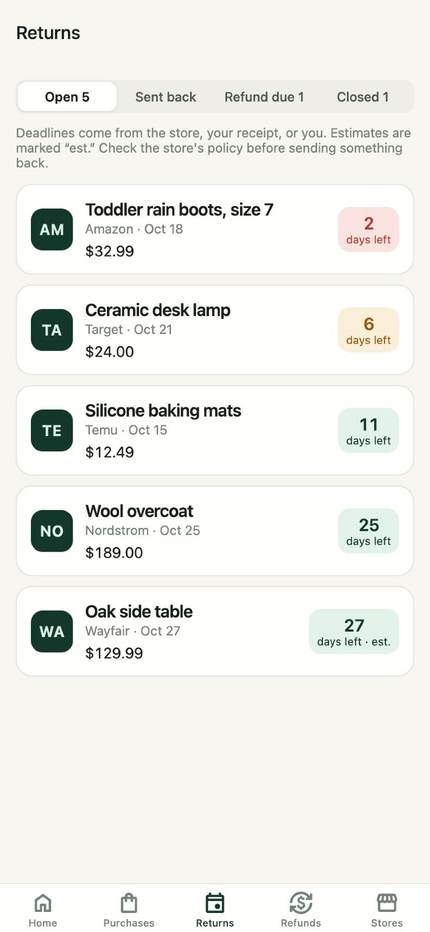
Return countdowns
Every purchase with a return deadline shows how many days you have left. SaveBack reminds you a week out, two days out, and on the last day.
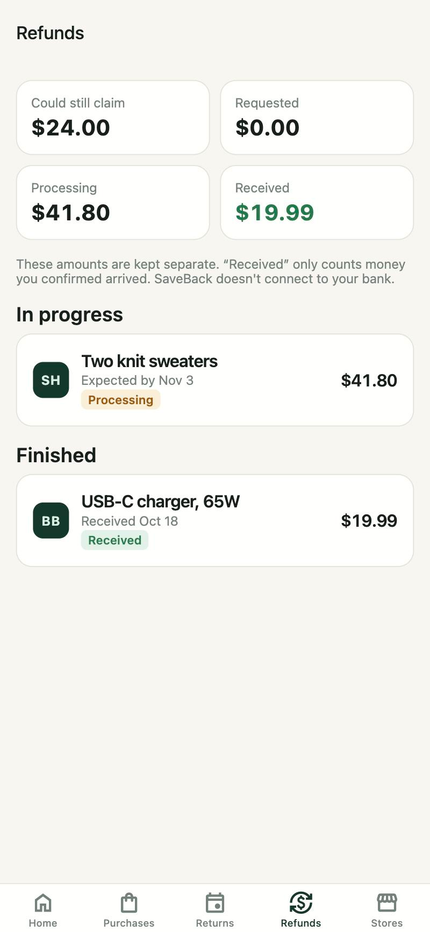
Refunds you can count on
Track each refund from requested to money in your account. Expected, requested and received amounts stay separate, and late refunds are flagged.
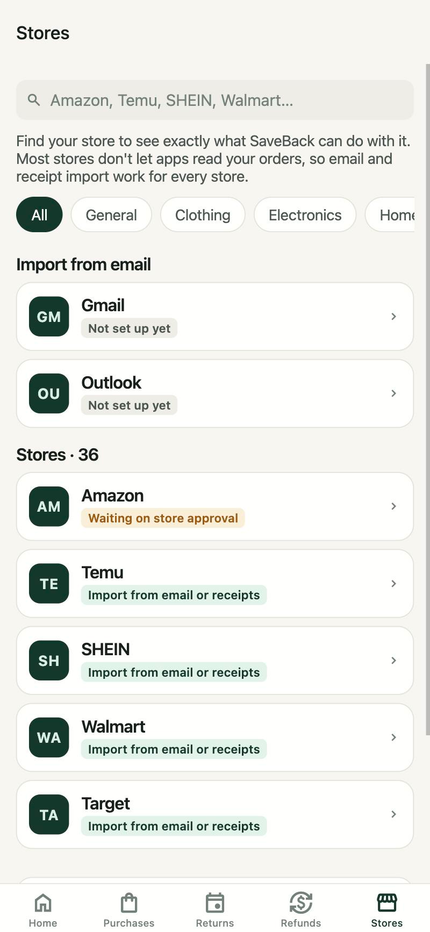
Every store, honestly labeled
Search nearly 500 stores to see exactly what SaveBack can do with each. Most stores don't let apps read your orders, so SaveBack imports from your order emails and receipts instead.
Three ways to add a purchase
Whichever store you bought from, SaveBack has a way in. Nothing is added until you confirm it.
- Order emails
- Connect Gmail or Outlook. SaveBack finds order, shipping and refund messages and shows you what it found.
- Receipts
- Photograph a paper receipt or pick a PDF or screenshot. Files stay private to your account.
- By hand
- Store, item, date and price take under a minute. Add the return deadline from the store's order page.
SaveBack launch special
SaveBack is launching for just $0.99.
We're giving our first 10,000 customers the opportunity to get SaveBack for only $0.99. After the first 10,000 paid downloads, the price increases to $2.99.
One payment. No subscriptions. No monthly fees. Just a smarter way to keep track of purchases, receipts, returns and refunds.
Launch price
At launch$0.99
For the first 10,000 paid App Store purchases. Pay once, keep it forever.
Standard price
Later$2.99
After the first 10,000 paid purchases. Still a one-time purchase.
Don't miss the launch price.
The launch price applies to the first 10,000 paid purchases of SaveBack on the App Store, counted from Apple's sales reports. Re-downloads, updates, TestFlight installs and free promo codes don't count, and website visits or sign-ups aren't purchases. Everyone gets the same full version of SaveBack. If you buy at $0.99, you keep it and are never charged the difference. Apple processes every purchase and shows the final price before you buy; prices outside the U.S. follow Apple's regional pricing. Apple's reports arrive about a day later, so the change to $2.99 can follow the 10,000th purchase by a day or so.
Questions
How much does SaveBack cost?
SaveBack launches at $0.99 for the first 10,000 paid App Store purchases. After that, it's $2.99. Either way it's a one-time purchase when you download it: no subscription, no in-app purchases, no premium tier, and every feature is included.
Can SaveBack connect to my Amazon, Temu or SHEIN account?
Not to read your orders. None of them currently let outside apps read a U.S. shopper's order history. SaveBack imports those purchases from your order and shipping emails, receipts you photograph or upload, or details you type in. Each store's page in the app says exactly what's possible.
Will you ask for my store passwords?
Never. Where a provider supports connecting (like Gmail or Outlook), you sign in on the provider's own page and approve access there. SaveBack never sees or stores your password.
What does connecting my email allow?
Gmail and Outlook grant read access to your mailbox for this kind of connection. SaveBack only looks for order, shipping and refund messages, keeps the purchase details it extracts, and doesn't store full emails. You review everything before it's added, and you can disconnect any time.
Does SaveBack work on Android or the web?
SaveBack is an iPhone app. This website is for information and support.
Does SaveBack check my bank for refunds?
No. You mark a refund as received when the money arrives. SaveBack never connects to your bank.
How do I delete my account?
In the app, open Account and tap Delete my account. Everything you stored in SaveBack is deleted.
More help: Support